Tutorial 2 of 7
Mexicano rounds and tournament brackets
Beginner 8 min
Run a Mexicano round by round, then seed a single- or double-elimination bracket from your ratings, click winners and export the bracket as SVG or PNG.
This tutorial uses the Padel club template (File → Templates…). It has a Sunday Mexicano that has not started yet and a club championship with three results.
1. Mexicano: one round at a time
Open Mixer nights and select Sunday Mexicano. Click Draw rounds. Unlike an Americano, only round 1 can be drawn — the next pairings depend on the scores. The dashboard says so too: “Sunday Mexicano: enter the scores of round 1 to draw the next round.”
Enter the round 1 scores. When the last court of the round is complete, Fieldday asks the scheduler again and the next round appears, paired from the standings. You never have to press anything in between.
2. A tournament from your roster
Open Tournaments and click New tournament. In Tournament settings and entrants:
- Format — Single elimination, Double elimination or Round robin (everyone plays everyone).
- Seeding — By roster rating (best first) sorts entrants by the Rating column of your roster (players without a rating go last); As listed (first = top seed) keeps your order, which you change with the arrow buttons; Random draw (seeded, reproducible) uses the Draw seed so the same draw comes out every time.
- Third-place match for knockouts.
- Use all active players fills the entrant list; Add player picks single names.
Click Update bracket.
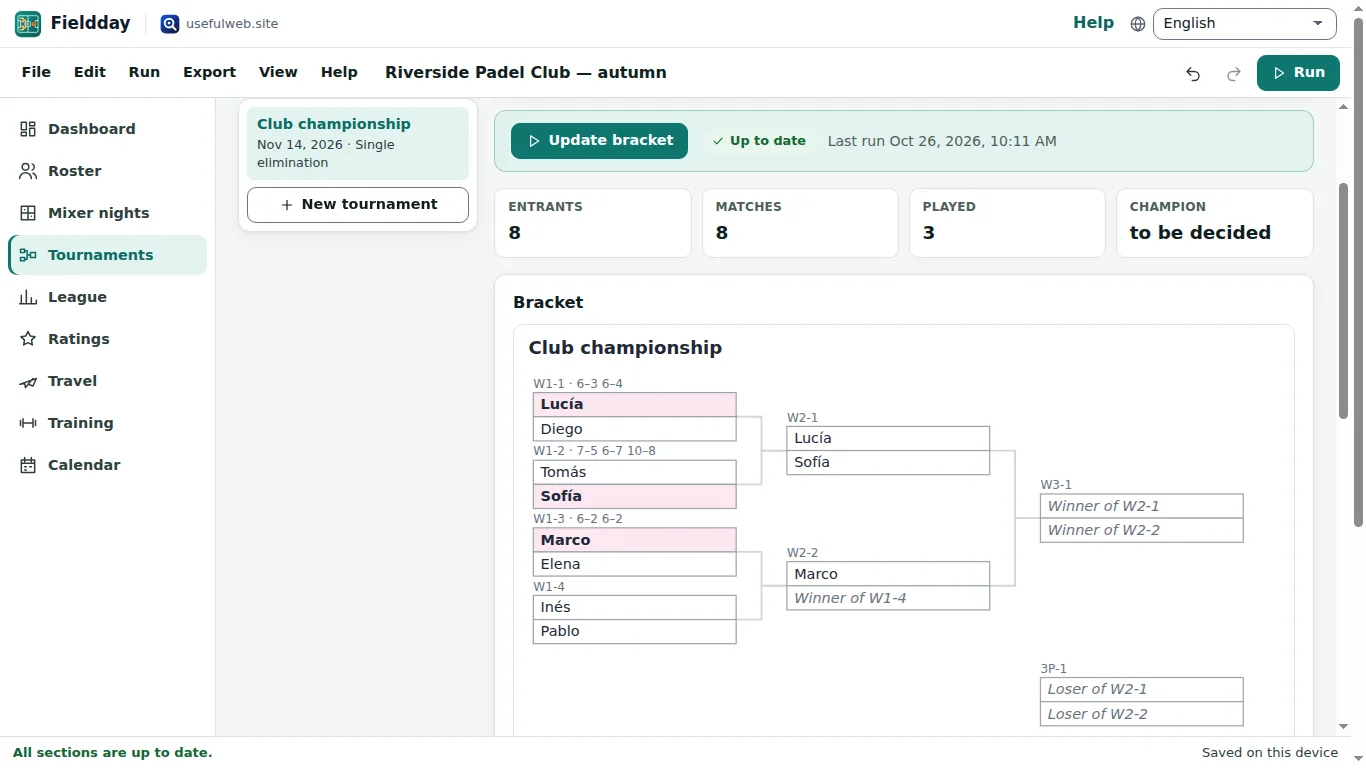
3. Enter results
Under the Bracket the Match list shows every match that is ready, with a button per side — Lucía wins, Diego wins and so on. Click the winner and the bracket is redrawn with the winner moved on. Click the same button again to take a result back. Round robins also offer Draw.
When Count results in the ratings is on, every decided match also lands in the rating log (see Ratings from every match).
4. Export or send the bracket
The Export menu lists, for the selected tournament:
- Matches of … (CSV) — the match list with rounds and results.
- Bracket of … (SVG) and (PNG) — the drawing for a notice board or a chat.
- Send bracket of … to another app… — passes the SVG to an app that accepts drawings via the App Bridge.
Export → Club report (print or PDF)… puts brackets, standings and findings into one printable page.
Ready to try it?