Tutorial 6 of 7
Training plans for runners and lifters
Intermediate 10 min
Track time trials and test sets, get race predictions, goal paces and splits, estimated one-rep maxes and a loaded percentage block with plates per side.
Training has two parts: Running and Strength. Both keep a history per athlete so you can see progress over time.
1. Runners
Load Running club: marathon training block and open Training → Running. Each runner has:
- Name, Goal race, Split strategy (even, negative or positive) and Pace change start → finish (%).
- Time trials: Add time trial with Date, Distance and Time (for example
49:20or1:35:40).
Click Run all runners. For every trial the Running Pace Calculator returns the pace and predictions for other distances. Fieldday then:
- predicts each runner's goal race from the latest trial,
- shows the Goal pace and asks the calculator for goal-race splits with the chosen strategy,
- compares with the first trial — 3:43 faster or 1:40 slower.
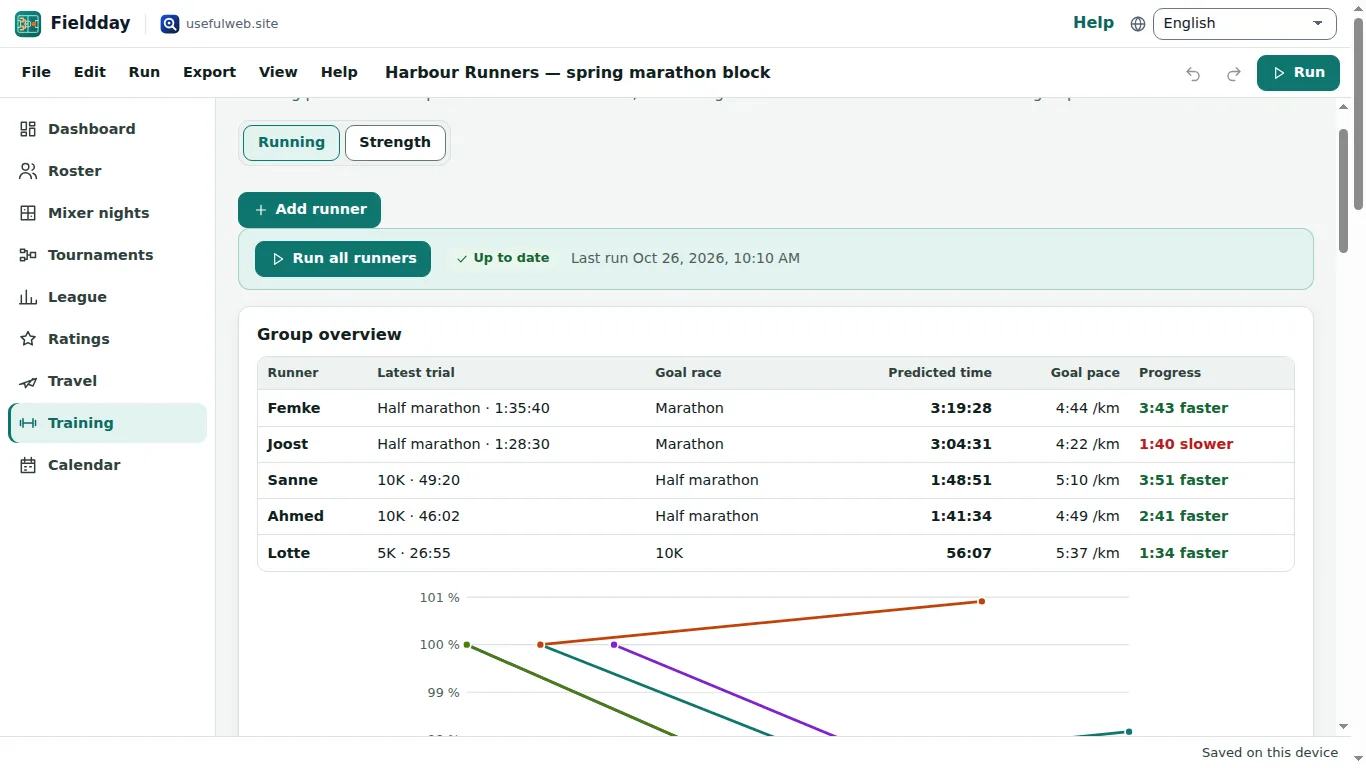
Group overview puts all runners in one table. The chart shows each prediction as a percentage of that runner's first one, so runners with different goals can be compared.
2. Lifters
Load Strength block: 1RM tests and loading plan and open Training → Strength. Choose the Unit, then for each athlete and lift:
- Test sets — Add test set with Date, Weight, Reps and optional RPE. Estimated 1RM comes from the One-Rep Max Calculator (average of several formulas).
- Bar weight for the plate maths.
- Percentage block (from the latest test) — weeks with % of 1RM and Sets × reps. Add week extends it.
Click Run all lifts. Each week gets a Load and Plates per side from the calculator's plate loader; when the exact load cannot be made with standard plates, the nearest load below is shown.
3. Put sessions in the calendar
Open Calendar and use Repeat a training slot weekly (Repeat weekly…) to add, say, Tuesday and Thursday sessions for eight weeks in one go.
Ready to try it?